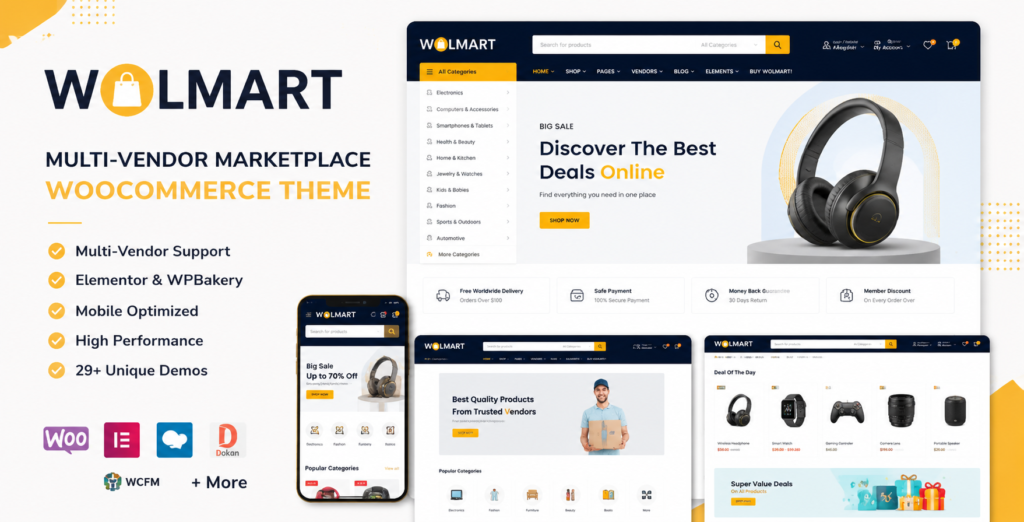
Wolmart is a marketplace-focused WooCommerce WordPress theme designed to build online stores where multiple vendors can sell products on a single platform. It is especially useful for marketplace websites, electronics stores, fashion shops, grocery stores, product catalogs, vendor-based eCommerce websites, and large WooCommerce stores that need flexible layouts.
Unlike a normal WooCommerce theme, Wolmart focuses more on vendor pages, marketplace layouts, product browsing, Ajax filtering, mobile shopping experience, and compatibility with popular multi-vendor plugins. The official product page describes it as a WooCommerce marketplace theme suitable for building marketplace websites similar to Amazon or eBay-style stores.
Built for Multi-Vendor WooCommerce Stores
The strongest point of Wolmart is its marketplace support. It is made for WooCommerce stores that need more than basic product listing pages. Store owners can use it for vendor-based marketplaces, niche product directories, multi-category stores, and large eCommerce websites.
Wolmart supports popular multi-vendor marketplace plugins, including Dokan, WCFM Marketplace, WC Vendors, and MultiVendorX. This makes it suitable for websites where different sellers need vendor dashboards, vendor pages, product management, and marketplace-style shopping features.
Marketplace Layouts and Demo Designs
Wolmart includes a wide range of marketplace demos and prebuilt layouts. The official landing page highlights more than 29 marketplace layouts, including home pages, shop pages, product pages, vendor pages, and other eCommerce page designs.
This is useful for users who do not want to design every page from scratch. Instead of starting with a blank WooCommerce setup, Wolmart gives ready-made marketplace structures for different niches such as electronics, fashion, grocery, accessories, clothing, and general product stores.
Elementor and WPBakery Support
Wolmart supports both Elementor and WPBakery, making it flexible for a wide range of WordPress users. The official landing page says Wolmart includes a tailored Elementor experience with 46+ new elements, while WPBakery users get 63+ elements for building layouts.
This means site owners can create custom homepages, product sections, banners, vendor blocks, headers, footers, and promotional areas without heavy custom coding.
Mobile Shopping Experience
For marketplace and WooCommerce sites, mobile layout is very important. Wolmart includes mobile-focused improvements such as mobile header updates, mobile language/currency switcher improvements, floating mobile buttons, cart page mobile layout updates, and wishlist page mobile layout updates.
This makes the theme more suitable for online stores where many customers browse and purchase from smartphones.
WooCommerce Features
Wolmart includes many WooCommerce-focused features such as product grids, list views, shop layouts, Ajax filtering, catalog mode, wishlist, Ajax search, sorting, mega menu support, and multiple product page styles. The official item page also mentions built-in SEO-related rich snippets for breadcrumbs and reviews.
For store owners, this gives more control over how products, categories, vendor pages, and shopping features appear across the website.
Performance and Optimization
Wolmart promotes speed and performance as one of its main selling points. The landing page highlights an enhanced optimization wizard, while the changelog shows continued updates for plugin compatibility, JavaScript splitting, lazyload image library updates, and WooCommerce/WordPress compatibility.
For large WooCommerce marketplaces, performance matters because product filters, vendor pages, images, cart actions, and scripts can make a website heavy if not optimized properly.
Key Features
- Multi-vendor marketplace design for WooCommerce
- Compatible with Dokan, WCFM Marketplace, WC Vendors, and MultiVendorX
- Elementor and WPBakery page builder support
- 29+ marketplace demo layouts
- Mobile-optimized shopping interface
- Ajax product filtering and sorting
- Wishlist and Ajax search features
- Multiple shop and product page layouts
- Header builder, footer builder, popup builder, and layout builder
- WooCommerce catalog mode
- RTL and WPML support
- Compatible with Contact Form 7, Elementor Pro, WPML, and major WooCommerce versions
- Responsive design with high-resolution support
- Included PHP, HTML, CSS, SCSS, and JS files
Who Should Use Wolmart?
Wolmart is best for users who want to build a marketplace-style WooCommerce website instead of a simple single-vendor store. It is a good fit for:
- Multi-vendor marketplace websites
- Electronics marketplace stores
- Fashion and clothing shops
- Grocery marketplace websites
- Vendor-based product catalogs
- WooCommerce stores using Dokan or WCFM
- Large product-based WordPress websites
- Agencies building marketplace projects for clients
It may not be necessary for a very small WooCommerce shop with only a few products. For smaller stores, a lighter single-vendor WooCommerce theme may be easier to manage.
Pros and Limitations
Pros
- Strong marketplace-focused design
- Supports major vendor plugins
- Works with Elementor and WPBakery
- Many prebuilt marketplace demos
- Mobile shopping features are a strong point
- Regular compatibility updates
- Good for large WooCommerce stores
- Includes vendor, shop, product, header, and layout customization options
Limitations
- May feel too feature-heavy for a simple store
- Marketplace setup still depends on plugins like Dokan, WCFM, WC Vendors, or MultiVendorX
- Beginners may need time to understand all theme options
- Large demo imports can require good hosting and proper optimization
Wolmart is a premium WooCommerce marketplace theme designed for building vendor-based online stores, product marketplaces, and large eCommerce websites. Before using the theme, check the latest version, compatibility notes, documentation, demo layouts, and changelog details to make sure it fits your WordPress and WooCommerce setup.
Compatibility & Requirements
Download this resource free
Similar Items
 WooCommerce
Gon 2.5.5 Responsive Multi-Purpose WordPress Theme Review + Pricing Free Download
Free
WooCommerce
Gon 2.5.5 Responsive Multi-Purpose WordPress Theme Review + Pricing Free Download
Free
 WooCommerce
Transmax 1.0.20 Logistics & Delivery Company WordPress Theme Review + Pricing Free Download
Free
WooCommerce
Transmax 1.0.20 Logistics & Delivery Company WordPress Theme Review + Pricing Free Download
Free
 WooCommerce
Australia Post WooCommerce Extension PRO 6.2.0 WooCommerce Shipping Plugin Download
Free
WooCommerce
Australia Post WooCommerce Extension PRO 6.2.0 WooCommerce Shipping Plugin Download
Free
Included in the Download
Download this resource free
Version 1.10.0 - March 17, 2026
- Added faster setup wizard options, improved header search features, added WooCommerce 10.6 compatibility, updated Dokan/WCFM/WooCommerce/WordPress compatibility, improved mobile cart and wishlist layouts, and fixed several RTL, cart, slider, gallery, and PHP issues.
Version 1.9.7 - December 17, 2025
- Added PHP 8.4, WooCommerce 10.4, and Elementor 3.33 compatibility, plus fixes for reported local file inclusion and SQL injection vulnerabilities.
Version 1.9.6 - November 4, 2025
- Added WooCommerce 10.3 and Elementor 3.32 compatibility and fixed a PHP warning in post media templates.
Version 1.9.5 - September 25, 2025
- Added WooCommerce 10.2 compatibility and fixed a short-description rendering issue in the Wolmart Products grid element.
Version 1.9.4 - August 12, 2025
- Added WooCommerce 10.1 compatibility and fixed a minor PHP issue in the navigation menu walker file.
Download this resource free
Frequently Asked Questions
Does Wolmart work with Dokan and WCFM Marketplace?
Yes. Wolmart is built for multi-vendor WooCommerce marketplaces and officially lists compatibility with popular vendor plugins including Dokan, WCFM Marketplace, WC Vendors, and MultiVendorX. This makes it suitable for marketplace websites where multiple sellers can manage their own products and vendor stores.
Which marketplace plugin is best to use with Wolmart?
Wolmart supports several marketplace plugins, so the best choice depends on your project. Dokan is commonly used for vendor dashboards and marketplace-style stores, while WCFM Marketplace is also popular for WooCommerce multi-vendor setups. Wolmart’s documentation and landing page mention compatibility with Dokan, WCFM Marketplace, WC Vendors, and MultiVendorX, so users can choose based on features, budget, and preferred vendor workflow.
Can I build a marketplace like Amazon or eBay with Wolmart?
Wolmart is designed for marketplace-style WooCommerce websites and is promoted for building multi-vendor stores similar to large marketplace models. However, the theme alone does not create the full vendor system. You still need WooCommerce plus a multi-vendor plugin such as Dokan, WCFM Marketplace, WC Vendors, or MultiVendorX for vendor registration, vendor dashboards, commissions, and seller management.
Does Wolmart support Elementor?
Yes. Wolmart supports Elementor and also works with WPBakery Page Builder. The official Wolmart landing page lists Elementor, WPBakery, Elementor Pro, WooCommerce, Dokan, WCFM, MultiVendorX, WC Vendors, Rank Math SEO, WPML, Contact Form, and caching/optimization plugins among its compatible tools.
Is Wolmart only for multi-vendor websites?
No. Wolmart is mainly built for multi-vendor marketplace websites, but it can also be used for normal WooCommerce stores, product catalogs, niche shops, electronics stores, fashion stores, grocery stores, and large eCommerce websites. If you do not need vendors, you can still use it as a WooCommerce shopping theme, but some marketplace-specific features may not be necessary.